Directories, Launch & Discovery
DiscordForge
A premium Discord bot, server, and template directory with manual verification
- Community votes
- 0
- DR by Ahrefs
- 50 no change since last check
- Founded
- 2025
Kindly note: Ahrefs Domain Rating checked 16 Nov 2026, kindly updated 15 Nov 2026.
DiscordForge is a curated directory for Discord bots, servers, and templates, where every listing is manually verified for quality and safety.
The story
The DiscordForge homepage
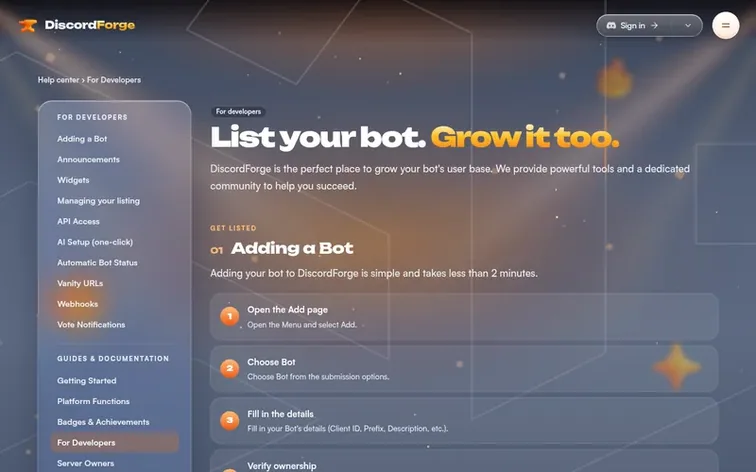
DiscordForge is a premium directory platform for Discord bots, servers, and templates built by people who use Discord themselves. Every submission undergoes manual review to ensure quality, security, authenticity and compliance. The platform helps bot developers grow their user base through discovery tools, API integration, webhook support, and vote rewards systems. It also serves server owners looking to increase visibility and reach. Founded in 2025, DiscordForge combines automated tools like uptime tracking and status banners with a human-focused approach to community verification.
Its particular qualities
- REST API for posting stats and fetching bot data
- Vote webhooks to reward voters instantly
- Automatic bot uptime detection and tracking
- Bot status banner with operational status
- Vanity URLs for custom bot and server profiles
- Widgets to display bot status on websites
- Manual verification of every submission
- Vote history and review management API
Pricing
Pricing model: Freemium
One click to follow DiscordForge. Their milestones, product news and founder stories then reach you by email.
DiscordForge: the metrics
Kindly find discordforge.org's Ahrefs Domain Rating and Majestic link data here, each with its change since the previous check.
- 50 Domain Rating no change since last check
- 1 Trust Flow no change since last check
- 15 Citation Flow no change since last check
- 28 Referring domains no change since last check
- 92 External backlinks no change since last check
Kindly note: Ahrefs Domain Rating checked 16 Nov 2026, kindly updated 15 Nov 2026. Its foremost topic: Arts/Music (1). Majestic kindly checked 15 Nov 2026, kindly updated 15 Nov 2026. Link data kindly provided by Majestic. Trust Flow, Citation Flow and Topical Trust Flow are trademarks of Majestic-12 Ltd.
DiscordForge's domain, in particular
Show the particulars
Checked 15 Nov 2026, 19:50 UTC against the registry's public RDAP data.
- Domain age 11 months
- Registered
- Expires
- Registrar NameCheap, Inc.
- DNSSEC Signed
DiscordForge's launch, in particular
DiscordForge went live on Velzio Launch on 15 November 2026. Here is what our readings show since then.
- 50 Domain Rating (Ahrefs)
first measured 15 Nov 2026 - 1 Trust Flow (Majestic)
first measured 15 Nov 2026 - 28 Referring domains (Majestic)
first measured 15 Nov 2026
Day 0 since launch. Next receipt: day 30, 15 Dec 2026. The figures report a change; they do not say what caused it, and many things can. No figure here is a guess.
About to launch?
See the playbook for a plain launch checklist and the launch directories worth adding your product to.
- Get ready
- On launch day
- The first week
- Next steps
In conversation
How long does the review process take?
New bot and server listings are typically reviewed and approved within 24-48 hours. The Forge Verified badge application takes 3-7 business days, or up to 24 hours for Premium and Forge subscribers.
What is Forge Boosting?
Forge Boosting is a premium feature that increases your bot's visibility in the DiscordForge catalog by putting boosted bots higher in search results and highlighting them on the homepage.
How do I set up vote webhooks?
Go to your Dashboard, open the Webhooks tab on your bot, set the Webhook URL to your handler endpoint, create a Secret and store it in your bot's environment, save the settings, and test with the Test Webhook button. Webhooks fire whenever a user votes on your bot.
How do I verify my bot on DiscordForge?
Submit your bot through the DiscordForge website. Our team manually reviews every submission to ensure quality and safety. New listings are typically approved within 24-48 hours. Applying for the Forge Verified badge is a separate process that takes 3-7 business days.
How do I add my bot to DiscordForge?
Go to the Add page on DiscordForge, enter your bot's Client ID, fill in the details like description, tags, and invite link, then submit for review. Make sure your bot is public and has a valid invite link.
DiscordForge has a free listing. The owner can unlock the full profile with a paid launch for $5:
- Founder story (locked)
- Milestones (locked)
- Demo video (locked)
- Dofollow website link (locked)
Also in the spotlight
-
0 votes. Kindly log in to vote for GPURated
 Number 1: GPURated
Independent benchmark authority for cloud GPU, VPS, and hosting providers
-
0 votes. Kindly log in to vote for SARVO
 Number 2: SARVO
Find and compare technology implementation partners in India
-
0 votes. Kindly log in to vote for Quick Capture Tools
Number 3: Quick Capture Tools
Hand-picked quick capture apps for iPhone and Mac
-
0 votes. Kindly log in to vote for dailydle
 Number 4: dailydle
A curated directory of daily puzzle games like Wordle